How to Unlock the Real Potential of Claude Code
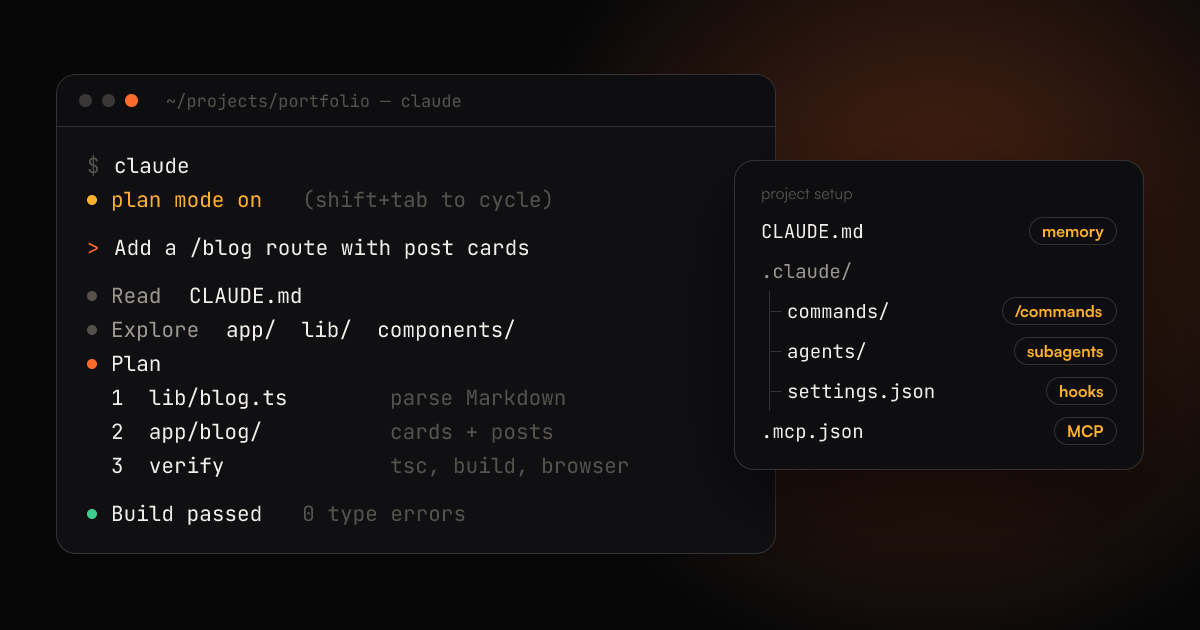
A practical Claude Code playbook from 9+ years of shipping software: CLAUDE.md, plan mode, verification, custom commands, hooks, subagents and MCP.
Most developers I talk to use Claude Code like a smarter autocomplete that lives in the terminal. They type a request, accept whatever comes back, and decide it is either magic or useless depending on the day.
Both reactions miss the point. Claude Code is an agent: it reads your files, runs commands, checks its own output and keeps going. How good it is depends far more on the setup around it than on the prompt you type. The same model that writes a sloppy patch in a bare repo will write careful, tested code in a repo that tells it how the project works and gives it a way to prove the change is right.
I have been shipping web apps, React Native apps and large scrapers for over nine years, and I now use Claude Code daily, including to rebuild this very site on Next.js. These are the habits that made the biggest difference, roughly in the order I would adopt them.
1. Give it a memory with CLAUDE.md
Every session starts from zero. Claude does not remember that your team uses pnpm, that the API lives in server/, or that you hate default exports. A CLAUDE.md file at the root of the repo fixes that: it is loaded into every session automatically.
Run /init once and Claude will draft one by reading your codebase. Then edit it down. A good CLAUDE.md is short and specific:
# Project notes

- Next.js 15 App Router, static export to ./out (no server at runtime)
- Run `npm run lint` (tsc) and `npm run build` before calling a task done
- Styles live in app/globals.css; reuse the existing tokens, never hard-code colours
- Never commit or push unless I ask
Write down the things a new teammate would get wrong in their first week. Skip anything Claude can read from the code itself.
There is also a personal file at ~/.claude/CLAUDE.md that applies to every project. Mine holds rules I never want to repeat, such as how I like commit messages written.
2. Make it plan before it types
The most expensive mistake is a confident change in the wrong direction. For anything bigger than a one-file fix, press Shift+Tab until you reach plan mode. In plan mode Claude can read and explore, but it cannot edit files. It comes back with a plan, and you get to correct it before a single line changes.
Read that plan the way you would read a junior developer's proposal:
- Did it find the existing helper, or is it about to write a second one?
- Is it touching files it has no reason to touch?
- Did it understand the actual bug, or only the symptom you described?
Fixing a plan takes one message. Untangling a 400-line diff built on a wrong assumption takes an afternoon.
3. Give it a way to check its own work
This is the single biggest multiplier, and the one most people skip. An agent that can verify its output will iterate until it is right. An agent that cannot will stop at "looks plausible".
Tell Claude how to prove a change works, and it will run that check without being asked again:
- Types and lint:
tsc --noEmit, ESLint, RuboCop - Tests: ask for a failing test first, then the fix that makes it pass
- Builds: a production build catches what the dev server forgives
- The real UI: with a browser tool connected, Claude can open the page, click through the flow and take a screenshot
When I fixed the SEO issues on this site, the useful step was not the edit. It was Claude rebuilding the static export and checking the generated HTML for duplicate headings, missing alt text and title length, instead of me eyeballing it.
4. Feed it the right context, then clear it
Claude works best with exactly the context the task needs. Too little and it guesses. Too much and the important parts get diluted.
- Mention files directly with
@path/to/fileinstead of describing them. - Paste the full error message and stack trace, not your summary of it.
- Drag in a screenshot when the bug is visual. It is faster than describing a misaligned button.
- Prefix a line with
!to run a shell command and put its output in the conversation.
Then keep the context clean. Use /clear when you switch to an unrelated task, so old details stop steering new work. In a long session, /compact summarises the history and frees up room without losing the thread. If Claude heads down the wrong path, press Esc to stop it straight away, and press Esc twice to rewind to an earlier point in the conversation.
5. Turn repeated prompts into commands
If you type the same instructions twice a week, make them a command. Any Markdown file in .claude/commands/ becomes a slash command, and $ARGUMENTS is replaced with whatever you type after it.
<!-- .claude/commands/fix-issue.md -->
Fix GitHub issue #$ARGUMENTS.

1. Read it with `gh issue view $ARGUMENTS`.
2. Find the root cause before editing anything.
3. Add a failing test, then make it pass.
4. Run the lint and the full test suite.
Now /fix-issue 142 runs your team's process every time, the same way. Commit the folder and everyone on the team gets the same commands.
For bigger workflows that need reference files or scripts, use skills: a folder in .claude/skills/ with a SKILL.md that describes when to use it. Claude loads a skill only when the task calls for it, so you can keep many of them without bloating every session.
6. Use hooks for rules that must always happen
Instructions in CLAUDE.md are followed most of the time. Hooks are followed every time, because they are shell commands that run at fixed points: before a tool runs, after a file is edited, when Claude finishes, and so on.
A classic example is formatting every file Claude edits:
{
  "hooks": {
    "PostToolUse": [
      {
        "matcher": "Edit|Write",
        "hooks": [
          {
            "type": "command",
            "command": "jq -r '.tool_input.file_path' | xargs npx prettier --write"
          }
        ]
      }
    ]
  }
}
Put it in .claude/settings.json. A PreToolUse hook that exits with code 2 blocks the action, which is how you stop edits to generated files or to anything in migrations/ that has already shipped.
Use this rule of thumb: if breaking a rule would cost you real time, make it a hook rather than a sentence in CLAUDE.md.
7. Delegate side quests to subagents
Some tasks produce a lot of noise: searching a large codebase, reading through logs, reviewing a big diff. Subagents handle these in their own separate context and report back only the conclusion, so your main session stays focused.
Claude Code ships with built-in ones for exploring and planning, and you can define your own as Markdown files in .claude/agents/:
---
name: reviewer
description: Reviews the current diff for bugs, security issues and missing tests. Use after finishing a change.
tools: Read, Grep, Glob, Bash
---

You are a strict senior reviewer. Report only real problems, one line each,
with the file, the line and the fix. No praise, no style nitpicks.
A second set of eyes that did not write the code catches things the author misses. That is as true for agents as it is for people.
8. Connect your real tools with MCP
Out of the box Claude can read files and run commands. With MCP (Model Context Protocol) servers it can also use your browser, your issue tracker, your database or your design files.
claude mcp add playwright -- npx @playwright/mcp@latest
With a browser connected, "the checkout button is broken on mobile" turns from a description into something Claude can reproduce, fix and confirm with a screenshot. Add servers for the tools you check most during a working day, and nothing more. Every server you add also adds to the context Claude carries around.
9. Pre-approve the safe stuff
Approving npm test for the fortieth time is how people end up clicking "yes" without reading. Allow the commands you trust in .claude/settings.json, and deny what Claude should never touch:
{
  "permissions": {
    "allow": ["Bash(npm run lint)", "Bash(npm run test:*)", "Bash(git diff:*)"],
    "deny": ["Read(./.env)", "Read(./secrets/**)"]
  }
}
The prompts that are left are the ones that deserve your attention.
10. Run it headless and in parallel
Once the setup above is in place, Claude Code stops being something you have to sit with.
claude -p "summarise what changed in the last 10 commits"runs one task without the interactive UI, so it fits into scripts and CI.- Separate git worktrees let you run several sessions on different branches at once: one fixing a bug, one writing tests, one exploring a refactor.
- The GitHub integration lets you mention Claude in an issue or pull request and get a branch back.
The mistakes I see most
- Vague requests. "Make it better" gets you a random change. Name the file, the behaviour you want and how to verify it.
- Accepting without reading. You still own the diff. Review it the way you would review a colleague's pull request.
- One endless session. Context from three tasks ago quietly shapes the current one. Use
/clearfreely. - No verification step. If Claude cannot run it, Claude cannot know it works, and neither can you.
- Over-configuring on day one. Start with
CLAUDE.mdand plan mode. Add commands, hooks and subagents when a real annoyance shows up.
A workflow that works
- Start in plan mode and describe the outcome, not the steps.
- Correct the plan until it matches how you would do it.
- Let it implement, with a clear way to verify, such as tests, a type check or a build.
- Review the diff yourself.
- Commit,
/clear, and start the next task fresh.
Claude Code does not replace knowing what good software looks like. It multiplies it. The developers getting the most out of it are not writing cleverer prompts. They are giving the agent the same things a strong new hire needs: context, a plan, a definition of done and a way to check the work.