Claude Code vs Cursor vs GitHub Copilot: Which to Use in 2026
An honest 2026 comparison of Claude Code, Cursor and GitHub Copilot: how each one works, what it costs now, where each wins, and which to pick.
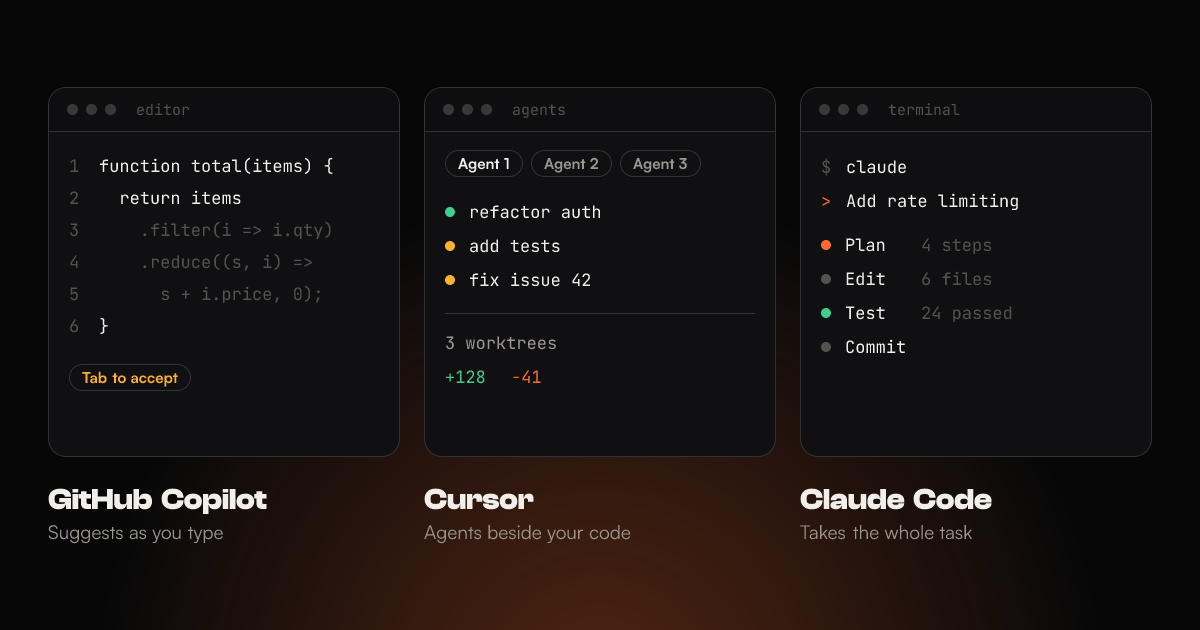
"Which AI coding tool should I use?" is the question I get most from other developers and from clients who want their team to move faster. The honest answer is that Claude Code, Cursor and GitHub Copilot are no longer three versions of the same product. Two of them started as autocomplete, but in 2026 each one bets on a different way of working.
I have shipped web apps, React Native apps and large scrapers for over nine years, and I use Claude Code daily. I built this blog with it. This post compares all three as they stand in October 2026: how they work, what they cost after this year's pricing changes, and which one fits which job.
The short answer
- Pick GitHub Copilot if you want the cheapest good assistant inside the editor you already use, especially JetBrains or Visual Studio, and your code lives on GitHub.
- Pick Cursor if you are happy to switch editors for the most polished AI-first editing experience, with fast Tab completions and agents running beside your code.
- Pick Claude Code if you want to hand over whole tasks, such as features, refactors, migrations and scripts, and review the result rather than type it.
Many developers end up combining two of them. More on that below.
They are not the same kind of tool
The useful way to compare them is by how much of the work you hand over. At one end you type and the AI suggests the next line. At the other end you describe a task and an agent comes back with a branch that builds and passes its tests.
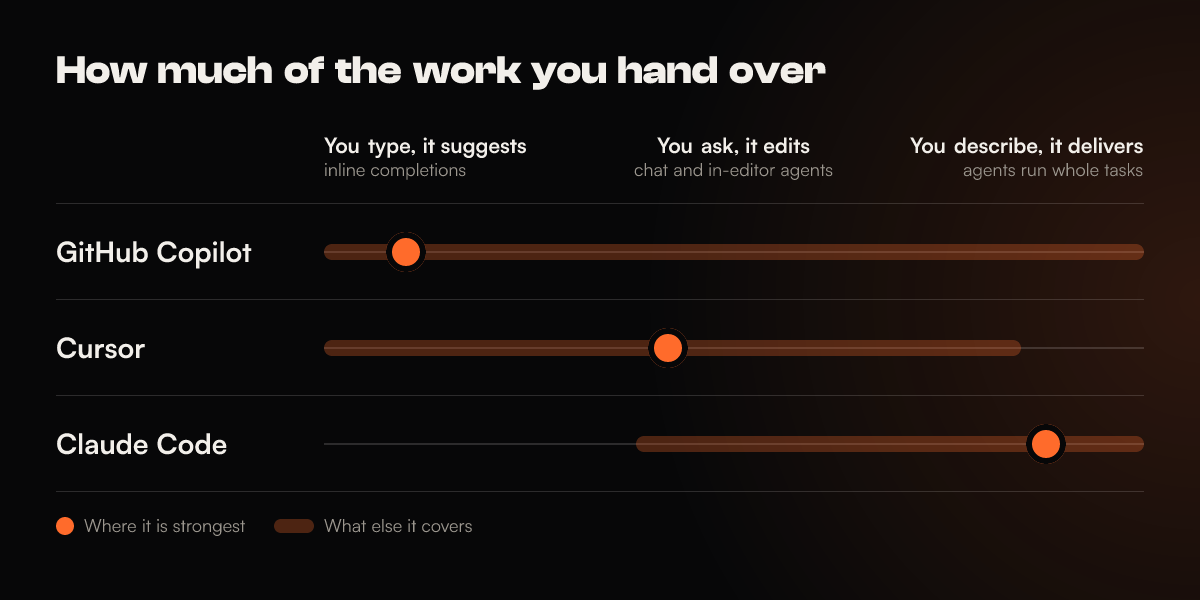
All three now have agents, chat and some form of cloud execution, so feature checklists look almost identical. Look at where each one is strongest instead:
- Copilot grew out of completions and keeps its centre of gravity inside your editor and on github.com.
- Cursor is the editor. It is a fork of VS Code rebuilt so that AI is part of every interaction, not a sidebar.
- Claude Code is an agent first. It started in the terminal and treats your editor as optional.
GitHub Copilot: the assistant that lives where your code lives
Copilot is the tool most developers try first, because it is a plugin for the editor they already have: VS Code, Visual Studio, JetBrains IDEs, Xcode, Eclipse and more. Nothing about your workflow has to change on day one.
Where it is strong:
- Completions everywhere. Inline suggestions and next-edit suggestions are unlimited on every paid plan, and they don't use your AI credits.
- GitHub integration. You can assign an issue to the Copilot cloud agent and get a pull request back, ask for Copilot code review on a PR, and pick up work from the Copilot CLI or the new desktop Copilot app. For a team whose whole process already runs through GitHub, that matters more than any benchmark.
- Model choice. Copilot offers models from Anthropic, OpenAI, Google, xAI and others, and you can switch per chat.
- Price. Pro is $10 a month, the lowest paid entry point of the three.
Where it is weaker:
- Agents are the newer half. Agent mode and the cloud agent are capable, but they arrived long after the completions, and on large multi-file changes you should expect to steer them more.
- Billing changed. On June 1, 2026 every Copilot plan moved from "premium requests" to GitHub AI Credits, billed by tokens at each model's API rate. Pro includes $10 of credits plus a $5 flex allowance. Long agent runs on frontier models use that up quickly, so set a budget.
- Some agent features are tier-gated. Third-party agents such as Claude and Codex inside Copilot need Pro+ or Max.
Cursor: the editor built around AI
Cursor is a full editor, not a plugin. Because it is a fork of VS Code, your extensions, themes and keybindings move across in a few minutes. The trade-off is that you are now using Cursor's editor, so JetBrains users have to switch IDEs.
Where it is strong:
- Tab. Cursor's multi-line Tab predictions, which also jump to your next edit, are still the most fluid typing experience of the three. For hands-on coding where you stay in control of every line, nothing else feels as fast.
- Agents beside your code. Cursor 3 (April 2026) added an Agents Window where you can run several agents in parallel, each in its own git worktree, and hand a task from your laptop to a cloud agent.
- Any model. Cursor offers models from Anthropic, OpenAI, Google and xAI, plus its own Composer models, which are cheaper per token and fast.
- Automations and Bugbot. Agents can be triggered by schedules, Slack messages or GitHub events, and Bugbot reviews pull requests.
Where it is weaker:
- You have to switch editors. That is easy from VS Code and a real cost from anything else.
- Usage pricing takes attention. Plans include a pool of usage, and anything above it is billed on demand at API rates. Cursor's 2025 switch to this model caught many people out with surprise bills. Check the usage dashboard in your first month.
- The agent works best from the editor. There is a Cursor CLI, but terminal-first, scripted work is not where Cursor spends its effort.
Claude Code: the agent you delegate to
Claude Code is Anthropic's coding agent. It reads your codebase, plans a change, edits files across the project, runs your commands and tests, and keeps going until the task is done. It started as a terminal tool. It now also runs as a VS Code and JetBrains extension (including inside Cursor), a desktop app, on the web at claude.ai/code, and from Slack and GitHub Actions. All of these use the same engine, project instructions and settings.
Where it is strong:
- Long, multi-file tasks. "Add a blog with Markdown posts, share images and an RSS feed, then build it and check the output" is the kind of request it handles end to end. This blog was built that way, a few prompts at a time.
- It is customizable. A
CLAUDE.mdfile for project memory, plan mode, custom slash commands and skills, hooks that run your formatter or tests after every edit, subagents for parallel research, and MCP servers for your own tools. I covered all of these in How to Unlock the Real Potential of Claude Code. - It is scriptable.
claude -p "..."runs non-interactively, so you can pipe logs into it, run it in CI or schedule recurring jobs. - It works with any editor. Because it doesn't depend on your editor, it fits Vim, JetBrains, VS Code or plain SSH sessions.
Where it is weaker:
- It only uses Claude models. If you want to switch to GPT or Gemini mid-task, use Cursor or Copilot.
- It has no autocomplete. It writes whole changes, not the next line. Most people pair it with an editor that has completions.
- Usage limits. Subscription plans reset every five hours and also have a weekly cap. Pro at $20 is often enough for focused daily use, but long agent sessions or parallel agents push you towards Max.
- Delegating is a skill. You get the most out of it once you learn to plan, give it a way to check its work, and review diffs. It rewards that investment more than the other two.
What they cost in October 2026
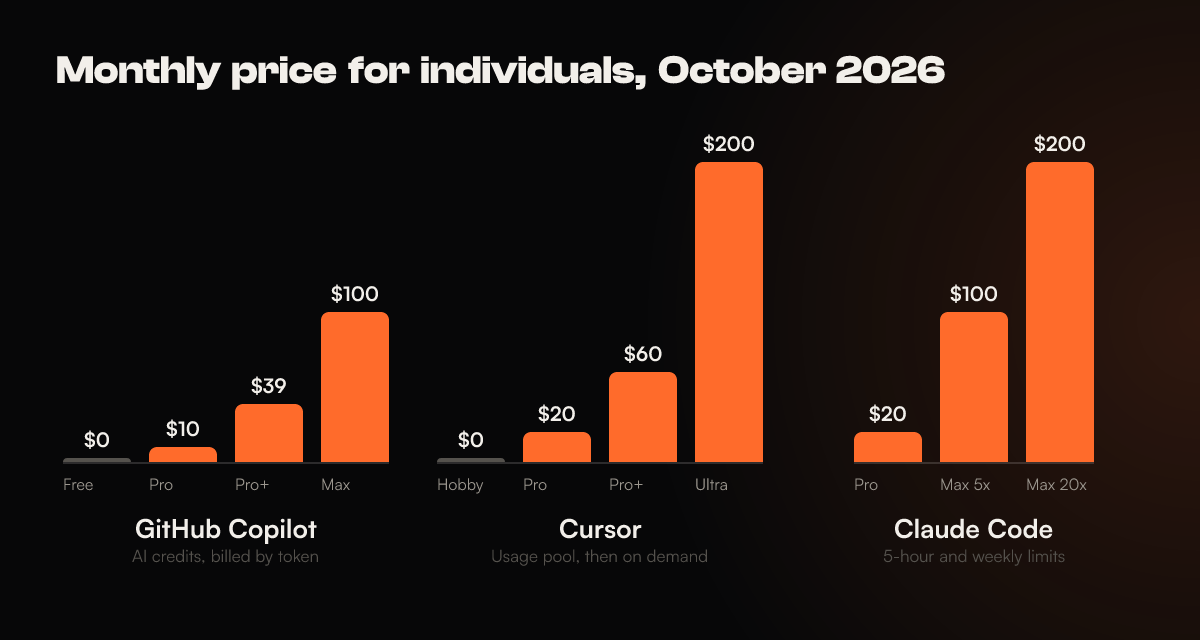
Prices changed a lot this year, so treat older comparisons with suspicion. These are the individual plans:
| Plan detail | GitHub Copilot | Cursor | Claude Code |
|---|---|---|---|
| Free tier | Yes: 2,000 completions and 50 chat requests a month | Yes (Hobby): limited agent requests | No. Claude's Free plan doesn't include Claude Code |
| Entry plan | Pro, $10/month | Pro, $20/month | Pro, $20/month ($17 billed yearly) |
| Heavy-use plans | Pro+ $39, Max $100 | Pro+ $60, Ultra $200 | Max 5x $100, Max 20x $200 |
| Teams | Business $19, Enterprise $39 per user | Teams $40 per user | Team from $25 per seat |
| How usage is counted | AI Credits by token; completions are free | Included usage pool, then on-demand at API rates | Five-hour session limits plus a weekly cap |
| When you run out | Buy more credits, or stop | Pay on demand, or upgrade | Wait for the reset, upgrade, or switch to pay-as-you-go API billing |
Two things in this table matter more than the headline prices:
- Copilot and Cursor charge for usage, while Claude Code has caps. On Copilot and Cursor a heavy month costs more money. On Claude's plans a heavy day mostly means waiting for the limit to reset. Which is better depends on whether your budget or your schedule is fixed.
- The cheapest plan is rarely the cheapest result. If an agent finishes a refactor in one run that would take you two hours of prompting elsewhere, the more expensive plan wins. Measure cost per finished task, not per month.
Which tool wins which job
This is how I would split the work, based on how each tool is designed and on the jobs I do most:
| Job | Best fit | Why |
|---|---|---|
| Typing code you already know how to write | Cursor, then Copilot | Tab and next-edit predictions are built for this |
| Quick questions about a file you are looking at | Any of the three | All three handle chat about the open file well |
| A feature that touches 10+ files | Claude Code | Plans, edits, runs checks and iterates on its own |
| Large refactors and migrations | Claude Code | Holds the plan across many steps; subagents explore in parallel |
| Turning GitHub issues into pull requests | Copilot | The cloud agent lives in GitHub already |
| Trying several approaches side by side | Cursor | Parallel agents in separate worktrees, all visible in the editor |
| JetBrains, Visual Studio or Xcode users | Copilot | Plugins for all of them; Claude Code covers JetBrains, and Cursor means changing IDE |
| Scripts, CI jobs and scheduled tasks | Claude Code | Non-interactive mode and GitHub Actions support |
| Lowest monthly cost | Copilot | $10 with unlimited completions |
| Switching between AI models | Cursor or Copilot | Both offer models from several companies |
Which one should you pick?
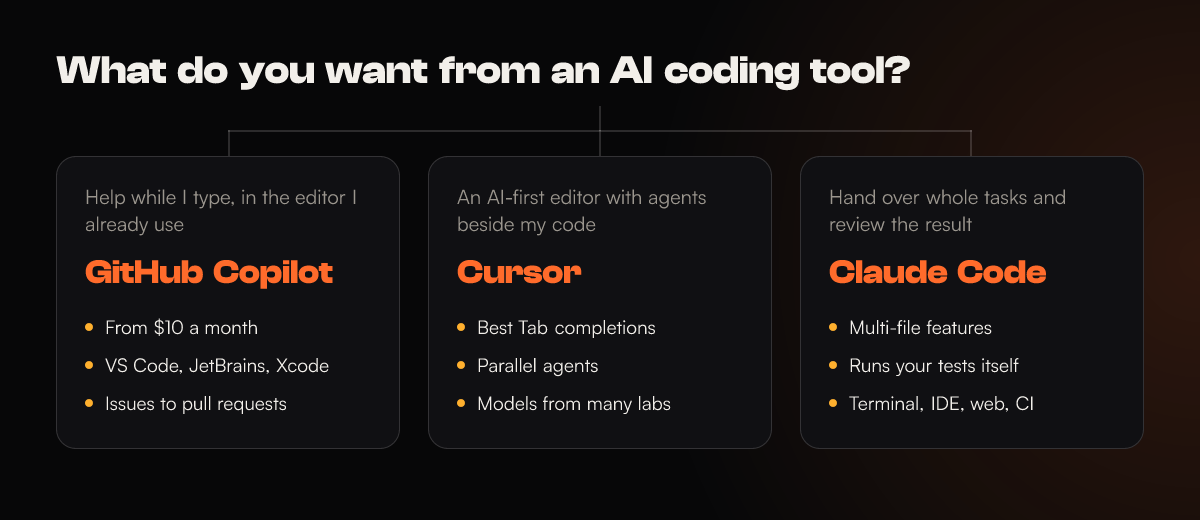
If you are still unsure, answer one question: when the AI is working, where do you want your attention to be?
- On every line as it is written: Cursor, or Copilot if you don't want to change editor.
- On the GitHub issue and the pull request: Copilot.
- On the plan before it starts and the diff after it finishes: Claude Code.
You don't have to pick only one
These tools overlap more than their marketing suggests:
- Claude Code runs inside Cursor and VS Code as an extension, so you can keep Cursor's Tab for typing and send big tasks to Claude Code in the same window.
- Copilot Pro+ and Max can run Claude as a third-party agent from GitHub.
- Cursor and Copilot both offer Claude models, so "Claude versus the rest" is often about the agent around the model, not the model itself.
The combination that works best for me is Claude Code for the heavy lifting and an editor with good completions for the small edits in between. The agent does the 300-line change, and I fix the two lines it got slightly wrong without leaving the file.
If you use more than one, keep project rules in one place. Cursor and Copilot can read an AGENTS.md file, and Claude Code falls back to it when there is no CLAUDE.md, so your build commands and conventions only need to be written once.
Mistakes to avoid when choosing
- Choosing by benchmark. Leaderboard scores change every month and mostly measure the model, not the tool. The agent around the model, meaning how it plans, checks and recovers, makes a bigger difference to real work.
- Ignoring the billing model. Credits, usage pools and session caps behave differently under heavy use. Read how each one counts usage before you commit a team to it.
- Skipping setup. All three get much better with a project instruction file that lists your build command, test command and conventions:
.github/copilot-instructions.mdfor Copilot,.cursor/rulesfor Cursor andCLAUDE.mdfor Claude Code. Without one, every tool guesses, and it often guesses wrong. - Merging without reading. Whichever tool you use, you are still the one responsible for the code. Review agent output the way you would review a pull request from a new teammate, because that is what it is.
- Not giving it a fair trial. One afternoon is not enough. Use a tool on real work for a week before you judge it, and try one tool at a time so you know which one made the difference.
The bottom line
There is no single winner in 2026, only a best fit for how you like to work. Copilot is the cheapest and least disruptive way to add AI to the editor you already use. Cursor is the best place to write code by hand with AI alongside you. Claude Code is the strongest choice when you want to delegate real work and review the result, and it is the one I would pick if I could keep only one.
Pricing and features in this post were checked against each vendor's official pages in October 2026. All three ship changes every few weeks, so check the current plans before you buy.
Sources: GitHub Copilot plans, Copilot's move to usage-based billing, Cursor pricing, Cursor pricing docs, Claude pricing and the Claude Code overview.